To configure desktop startup programs and save the current session run Startup Applications Preferences from terminal:
$ gnome-session-properties
Thursday, February 9, 2012

Monday, December 26, 2011
Qt/KDE based viewer of CHM files
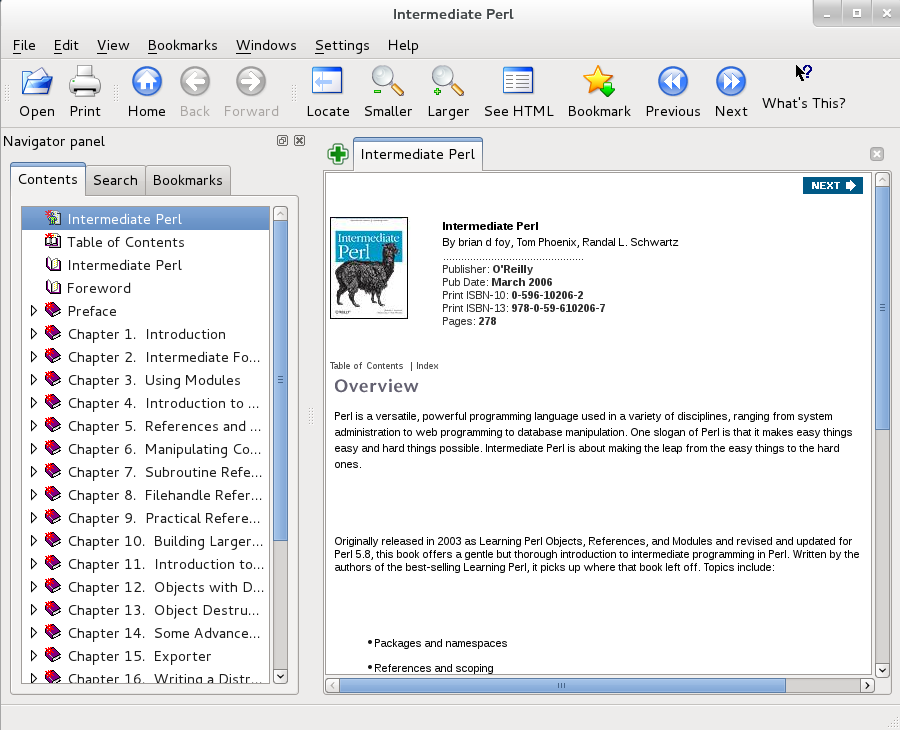
Install viewer for the files with .chm extension:
$ su -c "yum install kchmviewer"
Project site: http://www.kchmviewer.net/
Wednesday, December 21, 2011
Questions from Oracle Java Olympic 2011 (in Russian)
В какой коллекции
операция удаления первого элемента
занимает наименьшее время?
- ArrayList
- LinkedList
- Stack
- Vector
Какой оператор
используется для инвертирования значения
переменной типа boolean?
- !
- ^^
- NOT
- <>
- invert
Как уничтожить объект
в Java?
- вызвать Runtime.getRuntime().gc()
- присвоить null всем ссылкам на объект
- этого нельзя сделать вручную
- вызвать метод finilize() у объекта
- вызвать деструктор у объекта
Tuesday, December 13, 2011
Eclipse plugin for testing/editing regular expressions

Simple and convenient Eclipse plugin for testing/editing regular expressions: http://myregexp.com/eclipsePlugin.html
Monday, December 12, 2011
Download video from youtube: Chrome plug-in

Good Chrome plug-in for downloading video from youtube.com: http://www.chromeextensions.org/utilities/chrome-youtube-downloader/
Monday, November 21, 2011
gnome-shell extension: move Thunderbird indicator to the top panel

0. Download archive from here.
1. $ tar -zxvf thunderbird_to_status_bar_v2.1.tar.gz
2. $ mv thunderbird.status@gnome-shell.rdiachenko.org ~/.local/share/gnome-shell/extensions
3. Type 'r' in Alt+F2 prompt to restart Gnome shell
4. Install gnome-tweak-tool:
$ su -c "yum install gnome-tweak-tool"
5. Press Alt+F2 and type in 'gnome-tweak-tool'
6. Choose 'Shell Extensions' and switch on 'Thunderbird Status Icon Extension':

7. Type 'r' in Alt+F2 prompt to restart Gnome shell
More useful extensions here: http://roman-ivanov.blogspot.com/2011/11/fedora-16-useful-extensions-for-gnome.html
gnome-shell extension: move Skype indicator to the top panel
Moving Skype indicator from system tray to the top panel:

0. $ cd ~/.local/share/gnome-shell/extensions
1. $ mkdir skype.status@gnome-shell.rdiachenko.org
2. $ cd skype.status@gnome-shell.rdiachenko.org
0. $ cd ~/.local/share/gnome-shell/extensions
1. $ mkdir skype.status@gnome-shell.rdiachenko.org
2. $ cd skype.status@gnome-shell.rdiachenko.org
3. Create file 'metadata.json' with this content:
{
"description": "Integrates Skype Client into the status bar",
"name": "Skype Status Icon",
"shell-version": [ "3.0.2", "3.2", "3.4" ],
"uuid": "skype.status@gnome-shell.rdiachenko.org",
"version": 2.0
}
{
"description": "Integrates Skype Client into the status bar",
"name": "Skype Status Icon",
"shell-version": [ "3.0.2", "3.2", "3.4" ],
"uuid": "skype.status@gnome-shell.rdiachenko.org",
"version": 2.0
}
Saturday, November 19, 2011
gnome-tweak-tool: customize fonts, themes, shell extensions, enable desktop and window's buttons (minimize, maximize)
gnome-tweak-tool is a nice simple tool for customizing fonts, themes, shell extensions...
To install it, enter the following command:
$ su -c "yum install gnome-tweak-tool"
To install it, enter the following command:
$ su -c "yum install gnome-tweak-tool"
To run it, press Alt+F2 and type in 'gnome-tweak-tool'. Simple selecting the options performs the changes.
Some changes may require logging out and logging back in: type 'r' or 'restart' in Alt+F2 prompt to restart Gnome shell and see the changes.
Wednesday, November 16, 2011
I choose Deluge instead of Transmission
After my "Fedora 16: Installation notes (Part 2)" post I received this comment with several questions. In this post I'll try to answer on the last question: "What are the benefits to use Deluge over Transmission?".
In my first version of Fedora 10 Transmission didn't work properly, so I found a working application with a handy GUI. It was Deluge. As it was my first familiarity with linux, Deluge was an excellent decission.
What about its benefits over Transmission? In my point of view, Deluge has more convenient GUI than Transmission, and for the most users it is a key factor. Nevertheless, I made some search and found the following pros/cons:
Tuesday, November 15, 2011
Blogger: add Google +1 button, Facebook Like button and Tweet button for the whole blog
Add this gadget into the blog:

Script for adding Tweet Button:
<script src="//platform.twitter.com/widgets.js" type="text/javascript"></script>
<a href="https://twitter.com/share" class="twitter-share-button">Tweet</a>
For more information visit this site: https://dev.twitter.com/docs/tweet-button

Script for adding Tweet Button:
<script src="//platform.twitter.com/widgets.js" type="text/javascript"></script>
<a href="https://twitter.com/share" class="twitter-share-button">Tweet</a>
For more information visit this site: https://dev.twitter.com/docs/tweet-button
Subscribe to:
Posts (Atom)